![[^]](top.gif)
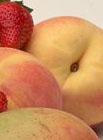

- Load or make a background image.
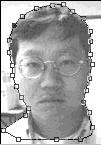
- Open an image which will superimpose over the background.
- Paths Paletter > Select the first Pen from the tools bar.
Click the outline of the object you want to superimpose. You need lots of practice to feel comfortable with the tool.
- Path > Make Selection.
- Feather = 0 will make the outline sharp, and = some # will make the blurred outline. (I used =0 for my example).
- Path > Turn Off Path.
- Copy the selection and Paste Into the background image.
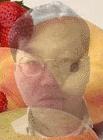
- Move Opacity bar to blend two images softly.
- Move Tool will help you position the image exactly to where you want the superimposed image to be.
- Voila!